2026 Podcast Journal Canva Kdp Interiors: A Practical Planning Tool for Organized Podcasting
Podcasting demands consistency, clarity, and careful coordination—especially when managing guests, topics, deadlines, and long-term growth. The 2026 Podcast Journal Canva Kdp Interiors is a structured, printable resource designed to support that workflow. It’s not a software platform or app, but a thoughtfully organized collection of 35 editable templates—delivered as high-resolution PDFs, JPGs, PNGs, and a ready-to-use Canva link—intended for podcasters who prefer tactile planning or digital flexibility without subscription fees.
What the 2026 Podcast Journal Canva Kdp Interiors Actually Offers
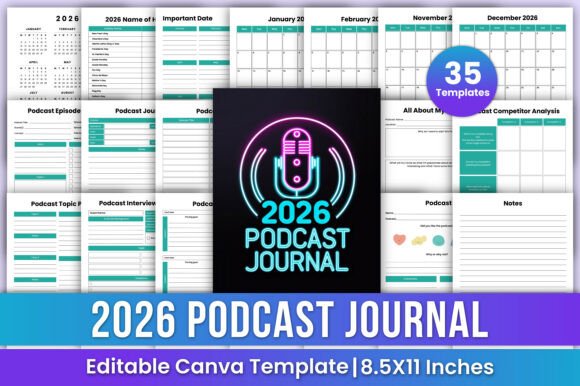
At its core, this journal functions as an all-in-one planning system. Unlike generic notebooks or scattered spreadsheets, it bundles purpose-built pages aligned with common podcast production stages. You’ll find:
- A full-year 2026 calendar with U.S. holidays and customizable important dates
- Monthly planners (January–December) with space for goals, key episodes, and recurring tasks
- Dedicated episode planners covering title, format, duration, segments, and publishing schedule
- A podcast log for tracking air dates, downloads, platform performance notes, and listener feedback
- An interview planner with prompts for pre-call research, talking points, and post-interview follow-up
- Competitor analysis pages to compare show structure, tone, guest selection, and audience engagement tactics
- A priority matrix (Eisenhower-style) to evaluate topic relevance, effort, and impact before recording
- Guest information sheets—including contact details, niche expertise, past appearances, and personal notes
- A “Review & Reflect” section for quarterly audits of metrics, content themes, and listener sentiment
Each template maintains consistent formatting—8.5×11 inches, CMYK color mode, 300 DPI resolution—making it suitable for both home printing and professional print-on-demand (KDP) use. The inclusion of a Canva link means users can adjust fonts, colors, layout spacing, or even restructure sections without design expertise.
Usability and Real-World Flexibility
The 2026 Podcast Journal Canva Kdp Interiors works best for creators who value intentionality over improvisation. For example, a solo host launching a weekly interview series might use the “All About My Podcast” page to document their mission statement, ideal listener profile, and brand voice guidelines—then reference those notes each time they draft an email pitch to potential guests. Meanwhile, a co-hosted educational show could leverage the “Topic Planner” to map seasonal themes across quarters, aligning content with academic calendars or industry events.
Because all templates are editable in Canva, users aren’t locked into rigid structures. If your workflow prioritizes script outlines over segment timing, you can delete or resize the “Episode Planner” columns and expand the “Notes” section instead. That adaptability matters—especially for educators or small business owners repurposing podcast content into newsletters, courses, or social clips.
That said, the journal doesn’t automate anything. There’s no sync with calendar apps, no transcription integration, and no analytics dashboard. Its strength lies in scaffolding—not replacing—your existing tools. Think of it as a central reference hub rather than a standalone ecosystem.
Design Quality and Production Readiness
The files meet standard commercial print requirements: CMYK color profiles, 300 DPI resolution, and no bleed—ideal for KDP submissions or local print shops. The PDFs open cleanly in Adobe Acrobat and most modern viewers, with text remaining selectable and editable where appropriate. The Canva link opens directly into a fully layered, grouped design—no need to ungroup elements to change headers or update dates.
Visually, the templates avoid excessive decoration. Typography is legible at standard reading sizes, and color palettes are muted enough to ensure readability whether printed in grayscale or full color. Icons are minimal and functional—not distracting. This restraint supports usability over aesthetics, which aligns well with professionals who prioritize function and speed.
Who Benefits Most—and When
This journal suits creators who already understand their podcast’s foundational needs but lack a unified system to manage them. It’s especially useful for:
- Established solo hosts aiming to scale output without sacrificing quality—e.g., shifting from biweekly to weekly episodes while maintaining guest prep rigor
- Small team producers coordinating across roles (host, editor, marketer), where shared templates reduce miscommunication about deadlines or content direction
- Educators and subject-matter experts using podcasts as teaching extensions—leveraging the “Topic Planner” and “Review” pages to align episodes with curriculum milestones
- KDP publishers creating companion journals for podcast-focused audiences, given the included print-ready assets and Canva editability
- New podcasters who want to avoid starting from scratch—but only if they’re willing to invest time upfront customizing and committing to regular use
It’s less suited for teams relying heavily on collaborative cloud tools (like Notion or Airtable), or for hosts who record spontaneously and rarely plan beyond the next episode. Likewise, if your workflow depends on automated reminders or cross-platform syncing, this remains a complementary—not primary—tool.
Practical Considerations and Limitations
While the 2026 Podcast Journal Canva Kdp Interiors provides breadth, it doesn’t include audio-specific technical logs—such as mic settings, editing software versions, or export presets. Nor does it offer built-in legal templates (e.g., guest release forms or music licensing checklists), though users can add those manually via Canva.
Another point worth noting: because it’s date-specific to 2026, its utility begins in late 2025 and extends through December 2026. Users planning multi-year shows should consider how they’ll transition between editions—or whether to adapt one year’s journal for broader use by editing date fields and reusing structural pages.
Finally, while the Canva link simplifies customization, users unfamiliar with Canva’s interface may need 20–30 minutes to learn basic layer selection, text replacement, and export settings. That learning curve is mild but real—and worth factoring in if time is highly constrained.
Making It Work Long-Term
Like any planning tool, the 2026 Podcast Journal Canva Kdp Interiors delivers value only when integrated consistently. One effective approach is to block 45 minutes each Sunday to review the prior week’s log, update upcoming episode plans, and refine guest outreach notes. Over time, patterns emerge—recurring gaps in topic diversity, underused segments, or mismatched guest expertise—that inform strategic shifts.
For KDP sellers, the editable nature also allows for light branding: swapping in your logo, adjusting accent colors to match your podcast artwork, or adding a short “How to Use This Journal” guide as a front matter page. That level of control supports differentiation in a crowded marketplace.
In summary, the 2026 Podcast Journal Canva Kdp Interiors isn’t revolutionary—but it is reliable. It fills a quiet but persistent gap: the need for a cohesive, adaptable, and professionally formatted planning system tailored specifically to podcasting’s unique rhythm. When used deliberately, it helps turn intention into execution—one episode, one guest, and one quarter at a time.