2026 Travel Journey Canva Kdp Interiors
Planning trips shouldn’t mean juggling sticky notes, scattered spreadsheets, and half-filled notebooks. The 2026 Travel Journey Canva Kdp Interiors is a thoughtfully built, all-in-one travel planner designed for real life — whether you’re booking your first solo weekend getaway or mapping out a multi-country sabbatical.
It’s not just another printable calendar. This is a living, adaptable system that meets you where you are: on your laptop editing in Canva, at your kitchen table reviewing flight details, or curled up with a pen jotting down memories after a sunset walk in Lisbon. Every section serves a purpose — no filler, no redundancy — just clear, functional tools to help you stay grounded while exploring.
What Makes This Planner Different?
Most travel planners ask you to fit your journey into rigid formats. The 2026 Travel Journey Canva Kdp Interiors flips that idea. Because it’s fully editable in Canva, you’re not locked into someone else’s design choices. Change fonts to match your personal brand, adjust colors to suit your mood or aesthetic, rearrange layout blocks to prioritize what matters most to you — like budget tracking before packing lists, or research sheets before daily itineraries.
You’ll receive high-resolution, print-ready 8.5×11 inch PDFs — crisp and professional for printing at home or a local shop. But the real flexibility comes from the editable Canva link included with every purchase. No design experience needed. Just click, type, drag, and personalize — then download or print when you’re ready.
Everything You Need — Organized, Not Overwhelming
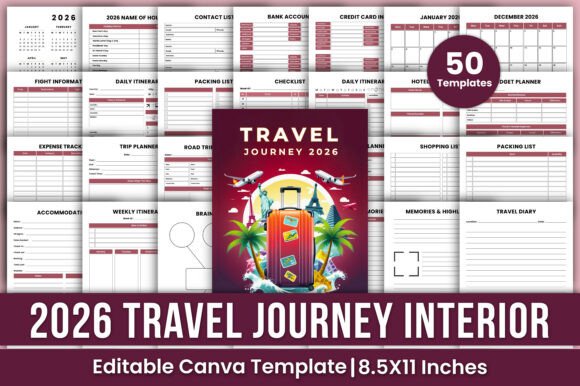
Inside the planner, you’ll find practical sections that work together, not against each other:
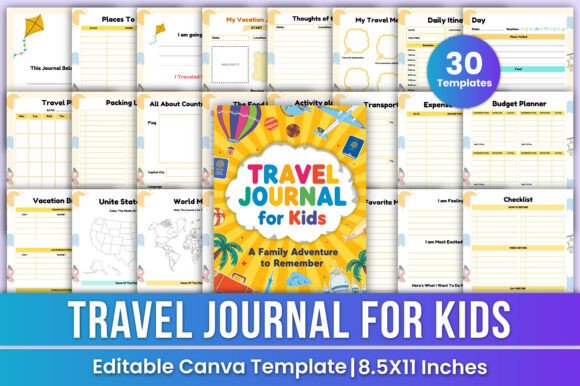
- Yearly & Monthly Planners — Start broad with your 2026 vision, then zoom into monthly goals, holidays, and key dates.
- Daily & Weekly Itineraries — Map out morning coffee stops, museum hours, train transfers, and quiet reflection time — all in one place.
- Travel Logistics Hub — Store flight confirmations, hotel addresses, check-in times, and even credit card info (with optional password-protected notes) — securely and accessibly.
- Budget Tools That Actually Help — Track expenses by trip, category, or day. Compare planned vs. actual spending without needing Excel formulas.
- Memory-Centered Pages — “Trip Memories,” “Highlights,” and “Travel Journal” prompts invite reflection, not just documentation. These aren’t afterthoughts — they’re built-in moments of meaning.
- Pre-Trip Prep Sheets — Packing lists (with checkboxes), shopping lists, research indexes, and brainstorm pages make planning feel intentional, not frantic.
And yes — there’s even a “Road Trip Overview” page for those spontaneous detours and scenic routes, plus an “Organized Chaos” section for ideas that don’t yet have a home. It’s designed to hold both structure and spontaneity.
Who Benefits Most From This Planner?
If you’ve ever said any of these, this planner was made for you:
- “I love traveling, but I waste so much time reorganizing the same info across apps.”
- “I want something beautiful *and* functional — not just pretty but practical.”
- “I’m launching a travel blog or Instagram account and need cohesive, branded planning tools.”
- “My partner and I plan trips together — having one shared, editable system would simplify everything.”
- “I teach geography or experiential learning and want students to document real-world journeys with intention.”
Freelancers use it to align work deadlines with travel windows. Educators adapt pages for student field trips. Small business owners building travel-related products (like luggage tags or itinerary kits) use the Canva files as design references or white-label starting points. Even hobbyist photographers lean on the “Place to Visit” and “Memories Highlights” pages to curate location-based storytelling.
Real-Life Uses You Can Start Today
Here’s how it fits into everyday routines:
- Before Booking — Use the “Research Sheet” and “Brainstorm” pages to compare destinations, list must-see spots, and note visa requirements — all in one visual space.
- While Packing — Pull up the editable packing list, duplicate it for each trip, and check off items on your phone or tablet — no more last-minute panic about chargers or adapters.
- During Your Trip — Jot quick notes in the “Daily Itinerary” or snap a photo of a handwritten memory on the “Travel Diary” page — later, paste it into your digital journal or printed scrapbook.
- After Returning Home — Fill out “Notes in Review” to capture lessons learned, favorite local eats, or things to change next time — turning experience into wisdom.
Things to Keep in Mind Before You Begin
This planner shines when used intentionally — but it’s not magic. A few thoughtful considerations will help you get the most out of it:
- You’ll need a free Canva account to edit the templates. No paid subscription is required for basic customization — just sign up and go.
- Think about your workflow: Do you prefer writing by hand? Print the PDFs. Lean on digital tools? Edit directly in Canva and export as needed.
- Start small. You don’t need to fill every page before your first trip. Try using just the monthly planner + packing list for your next weekend — then expand as it feels natural.
- Privacy matters. While the planner includes spaces for bank or card details, store sensitive information thoughtfully — consider using placeholders or keeping those sections offline and password-protected.
The 2026 Travel Journey Canva Kdp Interiors doesn’t promise perfection. It offers clarity. It replaces overwhelm with ownership — helping you move from dreaming about travel to designing it, step by meaningful step. Whether you're planning a cross-country road trip, a family reunion abroad, or simply rediscovering your own city with fresh eyes, this planner grows with you — because great journeys begin not with a destination, but with intention.