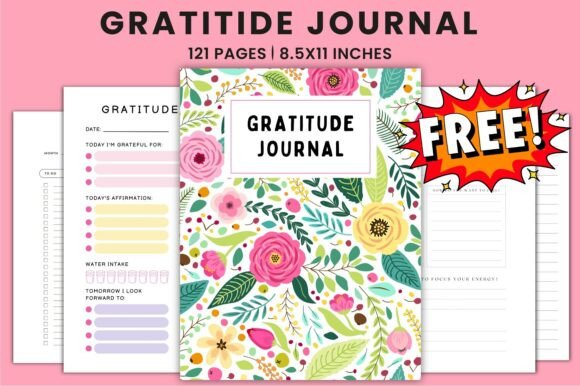
Free Gratitude Journal KDP Interiors: A Print-Ready Asset for Planners, Creators, and Publishers
Free Gratitude Journal KDP Interiors is not just another printable—it’s a production-ready interior template designed specifically for creators launching gratitude journals on Amazon KDP. It bridges the gap between intention and execution: you bring your brand voice, cover design, and marketing strategy; this file delivers the polished, compliant, and professionally formatted interior pages you need to publish fast—without compromising print quality or user experience.
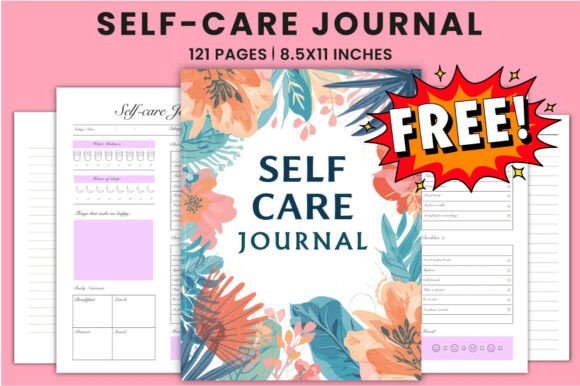
At its core, Free Gratitude Journal KDP Interiors is a 121-page, 8.5 × 11 inch layout built to Amazon’s current KDP specifications: 300 DPI resolution, CMYK color mode, no bleed, and optimized margins. It includes structured sections for daily gratitude reflection, goal tracking, to-do lists, and open-note space—all arranged with readability, usability, and print fidelity in mind. What sets it apart is how it integrates into real-world publishing workflows—not as a standalone download, but as a flexible, editable foundation.
How It Fits Into Your Publishing Workflow
This interior file isn’t meant to sit unused in a downloads folder. It’s designed to slot into your existing process—whether you’re a solopreneur launching your first journal or a content studio managing multiple KDP titles per quarter. For example:
- Before launch: Use the editable Canva link to customize fonts, adjust spacing, insert your logo or branding elements, and test different header styles—all without touching design software. Because it’s pre-formatted for KDP, you avoid last-minute formatting rejections due to margin violations or low-resolution images.
- During production: Drop your finalized PDF directly into KDP’s upload interface. The included JPG and PNG previews let you quickly verify page flow and visual consistency across devices—critical when reviewing thumbnails or preparing marketing assets like social media teasers or email banners.
- After publishing: Reuse the same interior structure across variations—e.g., “Gratitude + Habit Tracker” or “Gratitude + Weekly Review”—by duplicating the Canva file, swapping out one section, and exporting a new PDF. This accelerates versioning without redesigning from scratch.
This kind of reuse isn’t theoretical. Educators building classroom reflection tools, coaches developing client workbooks, and freelance designers packaging digital products all report cutting interior setup time by 60–75% when starting from a proven KDP-compliant base like Free Gratitude Journal KDP Interiors.
Compatibility and Integration With Other Tools
Free Gratitude Journal KDP Interiors works best when treated as part of an ecosystem—not an isolated asset. Its value multiplies when paired intentionally with other resources:
- Canva + KDP workflow: The editable Canva link means you don’t need Adobe InDesign or Affinity Publisher to make meaningful changes. You can adjust line spacing for accessibility, swap icons for culturally inclusive visuals, or translate select prompts—then export clean PDFs ready for KDP upload.
- Project management tools: Link the Canva file directly in Notion or ClickUp task cards labeled “Interior Finalization.” Assign deadlines, attach feedback notes, and track revisions alongside cover design and blurb copy—keeping the entire journal launch coordinated in one place.
- Marketing assets: The included JPG and PNG files aren’t just previews—they’re production assets. Use the high-res JPG as your Amazon “Look Inside” preview image. Pull individual PNGs (e.g., a single gratitude prompt page) for Instagram carousels or Pinterest pins that demonstrate actual journal functionality—not just stock mockups.
No special plugins or converters are needed. Because everything is delivered in standard, widely supported formats (PDF, JPG, PNG), it interoperates cleanly with tools like Google Drive for collaboration, Dropbox for client handoff, or even Airtable for version control across multiple journal editions.
Practical Implementation Tips for Consistent Results
Getting reliable output starts before you open Canva. Here’s what experienced users do differently:
- Verify your KDP account settings first: Confirm your printer location (US, EU, or JP) and check current margin requirements. While Free Gratitude Journal KDP Interiors follows general KDP guidelines, minor updates to their specs do occur—and your final PDF should match the exact settings tied to your account.
- Test print before publishing: Order a physical proof copy from KDP. Even with perfect specs, screen rendering differs from printed ink on matte paper. Use the proof to assess contrast on light-gray lines, legibility of small-font prompts, and overall page weight—especially if you plan to add heavier paper options later.
- Preserve structure while personalizing: Resist over-customizing early pages. Keep the first 5–7 pages clean—title, instructions, and sample entry—so readers immediately understand how to use the journal. Save deeper personalization (like custom affirmations or niche-themed prompts) for later sections where users are already engaged.
- Organize supporting files deliberately: Store the Canva link, PDF master, JPG preview, and PNG assets in a clearly named folder (e.g., “Gratitude_Journal_Interior_v1”). Add a README.txt noting the date of export, KDP region used, and any known edits—so future you (or a VA handling uploads) can reproduce results without guesswork.
Consistency isn’t about rigid repetition—it’s about maintaining clarity, usability, and brand alignment across every version you release. Free Gratitude Journal KDP Interiors supports that by giving you a stable interior framework, so your energy stays focused on differentiation—not formatting fixes.
Long-Term Use and Quality Control
Because this interior is built for durability—not one-off use—it scales with your growth. If you expand into related niches (mindfulness planners, student reflection journals, or team gratitude templates), you can adapt the same 121-page architecture: replace “Gratitude Prompt” with “Team Win,” swap the to-do list for “Meeting Action Items,” and retain the proven layout logic.
Quality control becomes simpler, too. Instead of auditing each new interior for KDP compliance, you audit only the changes you made—e.g., “Did I maintain 0.25” inner margin after adding a sidebar?” That reduces error risk and speeds up QA cycles significantly.
And because the file includes both PDF and source-editable access, you retain full ownership and flexibility. No subscriptions. No licensing fees. No dependency on third-party platforms beyond Canva’s free tier. Just a clean, reusable interior you control—today and five years from now.
If you find Free Gratitude Journal KDP Interiors useful, following the creator’s profile ensures you’re notified of updates—including expanded versions with additional layouts (e.g., undated editions, bilingual prompts, or minimalist variants)—so your toolkit evolves alongside your audience’s needs.