2026 Garden Planner Canva KDP Interiors: A Flexible, Print-Ready Tool for Thoughtful Gardeners
For gardeners who value intentionality over improvisation—and clarity over clutter—the 2026 Garden Planner Canva KDP Interiors offers a distinctive middle ground between rigid pre-printed journals and fragmented digital apps. It’s not a physical book you order once and use as-is. Instead, it’s a downloadable, editable interior file designed specifically for Kindle Direct Publishing (KDP) formatting, yet equally suited for personal printing or casual home use. What sets it apart is its dual nature: professionally structured for publishing standards, yet fully customizable down to font size, color, and layout—without requiring design expertise.
What Makes This Interior Different From Other Garden Planning Resources?
Most garden planning tools fall into one of three categories: static PDF planners (non-editable, fixed layouts), app-based trackers (convenient but screen-dependent and often subscription-based), or blank notebooks (flexible but lacking built-in structure). The 2026 Garden Planner Canva KDP Interiors occupies a less common niche: a print-ready, editable template built in Canva—meaning users can open it instantly in a free or paid Canva account, adjust text, reorder sections, add logos or notes, and export clean, high-resolution files.
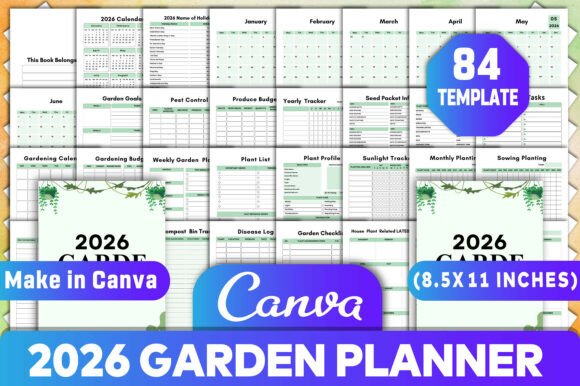
This isn’t just a calendar with gardening-themed headers. Its 40+ integrated components—from Sunlight Tracker and Soaking & Sprouting Log to Fruit & Vegetable Planting Guides and Pest Disease Log—are purpose-built to support both seasonal rhythm and day-to-day decision-making. Unlike generic planners that tack on gardening pages as an afterthought, this interior treats horticultural workflow as the organizing principle. For example, the Monthly Planting spread doesn’t just list crops—it aligns sowing windows with local frost dates, includes space for seed packet details, and links to the Seeding Log and Produce Budget for continuity.
How Customization Works—And Why It Matters
“100% customizable” isn’t marketing language here—it reflects technical reality. When you download the 2026 Garden Planner Canva KDP Interiors, you receive layered Canva files (not flattened images), plus printable PDF, JPG, and PNG versions. That means you can:
- Rename “Garden Bed A” to match your actual raised bed labels;
- Hide the House Plant Related Tasks section if you focus solely on outdoor growing;
- Add your own soil test results directly into the Garden Maintenance Checklist;
- Resize the Weekly Watering Schedule grid to fit drip irrigation zones instead of hand-watering rows;
- Translate planting notes into another language or adapt measurements for metric-only use.
This level of control matters most when consistency supports action—not bureaucracy. A gardener managing both a community plot and a backyard greenhouse may need different tracking logic than someone growing herbs on a balcony. Rather than forcing everyone into the same template, the 2026 Garden Planner Canva KDP Interiors invites adaptation without sacrificing professional-grade formatting.
Real-World Use Cases: Where This Interior Fits Best
The 2026 Garden Planner Canva KDP Interiors shines in situations where flexibility, visual clarity, and tangible output converge:
- Educators and extension volunteers who create customized handouts for workshops—adding local crop recommendations or drought-tolerant plant lists;
- Small-scale market gardeners needing consistent recordkeeping across seasons while keeping expenses, harvest yields, and compost inputs traceable;
- New gardeners overwhelmed by scattered advice—this interior bundles proven frameworks (like Seasonal Tasks and Yearly Overview) into one coherent flow;
- Hybrid planners who prefer writing by hand but want digital backup—editable Canva files allow quick reprints after seasonal updates.
It’s less ideal for users seeking real-time syncing across devices, automatic reminders, or AI-driven planting suggestions. Nor does it replace soil testing kits or pest identification guides—those remain essential external tools. But as a central hub for planning, reflection, and accountability, it bridges gaps many alternatives leave open.
Comparing Formats: When to Choose This Over Other Options
If you’re weighing options, consider how each format handles change. A printed journal locks you into last year’s layout—even if your garden layout shifted or your goals evolved. A spreadsheet gives flexibility but lacks intuitive visual hierarchy; tracking sunlight exposure across 12 months in Excel quickly becomes unwieldy. An app offers convenience but often silos data—your watering log lives in one place, your budget in another, and your plant profiles elsewhere.
The 2026 Garden Planner Canva KDP Interiors avoids those fragmentation pitfalls by unifying related functions within shared spreads. The Fertilizer Inventory ties directly to the Fertilizer Tracker; the Plant Profile page includes fields for sunlight needs, which feed into the Sunlight Tracker. These aren’t isolated checkboxes—they’re interlocking parts of a system.
That said, it requires a modest time investment upfront: learning basic Canva editing (drag-and-drop, text replacement, export settings). Users unfamiliar with Canva may need 20–30 minutes to orient themselves—not a barrier, but a consideration alongside alternatives like pre-formatted KDP interiors with no editing capability.
Practical Limitations to Keep in Mind
No tool eliminates all friction. With the 2026 Garden Planner Canva KDP Interiors, the main constraints are format-bound and user-dependent:
- It assumes access to a reliable printer and standard paper sizes (e.g., 8.5" x 11" or A4). Bulk printing multiple copies for team use adds cost and time.
- While highly adaptable, it doesn’t auto-calculate totals (e.g., expense summaries or harvest weight averages)—those still require manual entry or external calculation.
- Canva’s free tier limits some advanced features (like brand kit storage or bulk exports), though core editing remains fully accessible.
- It doesn’t include instructional content—no “how to prune tomatoes” guides or botanical illustrations. Its strength lies in structure, not education.
These aren’t flaws so much as boundaries of scope. Understanding them helps clarify whether this interior complements your existing resources—or fills a gap they miss.
Making Your Decision: Key Questions to Ask
Before choosing the 2026 Garden Planner Canva KDP Interiors, reflect on these practical questions:
- Do you prefer writing or typing? If handwriting is non-negotiable, ensure the exported PDF has sufficient line spacing and margin room.
- How often do your garden systems change? If you rotate crops annually or experiment with new techniques, editable templates offer long-term value over static ones.
- Do you share planning responsibilities? Customizable files let partners or co-gardeners tailor sections to their roles—e.g., one manages the Compost Bin Tracker, another handles the Garden Shopping List.
- Is portability important? While printable, this isn’t designed for pocket-sized field use—larger spreads like Bed Plan or Garden Ideas work best on desktop or tablet screens during planning sessions.
There’s no universal “best” planner—only the one that reduces cognitive load while supporting your actual habits. The 2026 Garden Planner Canva KDP Interiors excels when structure meets agency: when you want rigor without rigidity, professionalism without inflexibility, and clarity without oversimplification.