2026 Teacher Planner Canva KDP Interiors
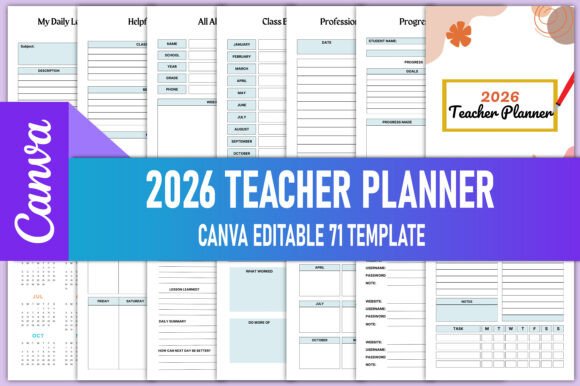
The 2026 Teacher Planner Canva KDP Interiors is a digital planning resource designed specifically for educators preparing to publish a physical or digital teacher planner on Amazon Kindle Direct Publishing (KDP). It consists of high-resolution, print-ready PDF files and an editable Canva link—allowing users to customize layouts, colors, fonts, and content before final export and upload to KDP.
This resource is not a pre-designed, static planner sold to end-user teachers. Instead, it serves creators—educators, designers, or small publishers—who want to develop and sell their own branded 2026 teacher planner on Amazon. The package includes interior page templates covering academic, organizational, and reflective functions: monthly and weekly spreads, lesson planning tools, student tracking sheets, classroom management aids, and professional development logs—all structured to meet KDP’s technical requirements for bleed, margins, and resolution.
People may be interested in the 2026 Teacher Planner Canva KDP Interiors for several practical reasons. First, building a planner from scratch requires significant time investment in layout design, typography consistency, grid alignment, and print formatting—especially when targeting KDP’s strict file specifications. Second, many educators have domain expertise but lack graphic design experience or access to professional tools like Adobe InDesign. Canva offers a lower barrier to entry while still supporting precise customization. Third, using a pre-structured, education-specific template reduces the risk of omitting key planner components that buyers expect—such as grade trackers, lesson plan grids, or attendance logs.
One benefit of this resource is efficiency: the editable Canva link allows real-time adjustments without needing to re-import assets or rebuild pages. Users can change color schemes to match branding, adjust spacing for readability, insert school logos, or localize holidays and term dates. The included PDFs are already optimized for CMYK printing, 300 DPI resolution, and standard KDP trim sizes (e.g., 8.5" × 11"), minimizing prepress troubleshooting. Additionally, the breadth of included tracker types—My Weekly Lesson Plan, Student Contact List, Classroom Inventory, Progress Report, and Semester Plan, among others—provides flexibility to curate a planner aligned with specific teaching contexts: elementary, secondary, special education, or international curricula.
However, there are tradeoffs. Because the files are built in Canva—not industry-standard publishing software—they may present limitations for advanced typographic control, multi-page master styles, or complex cross-referencing (e.g., auto-updating annual overview dates based on monthly inputs). Users cannot embed dynamic fields or formulas; all date entries, headers, and labels must be manually updated. Also, while the Canva template supports customization, it does not include editable vector icons or layered source files—meaning icon replacement requires uploading new assets or selecting from Canva’s library, which may affect visual cohesion.
Another consideration is licensing and usage rights. The 2026 Teacher Planner Canva KDP Interiors is intended for commercial use on KDP, but users remain responsible for ensuring all embedded fonts, icons, and imagery comply with Canva’s Pro license terms (if applicable) and KDP’s content policies. For example, using Canva’s free assets in a commercial product may require attribution or be restricted depending on the license tier. Likewise, modifying student-facing pages—like My Daily Chore Tracker or My Reading Routine Tracker—must preserve clarity and age-appropriateness, especially if marketing toward elementary educators.
This resource is a strong fit for educators who plan to self-publish a 2026 teacher planner on Amazon KDP and value structure over total creative freedom. It suits those who prefer working in Canva, need reliable print-ready outputs, and want comprehensive coverage of common teacher planning needs—from Daily Review to Professional Learning logs—without designing each page independently. It also supports iterative testing: creators can generate low-cost proof copies, gather feedback from fellow teachers, and refine sections before full launch.
Conversely, alternatives may be preferable in certain cases. Educators with existing design workflows in Adobe InDesign or Affinity Publisher—and who require pixel-perfect control over kerning, paragraph styles, or linked content—may find Canva’s interface limiting for large-scale projects. Similarly, those aiming to build interactive digital planners (e.g., Notion-based or hyperlinked PDFs with form fields) will need different tools entirely, as the 2026 Teacher Planner Canva KDP Interiors delivers static, print-focused pages. Additionally, if a creator intends to offer multiple formats—print + digital download + editable Google Slides—the Canva-based system may require parallel rebuilding efforts rather than a unified source file.
Practical decision-making starts with clarifying intent. Ask: Is the goal to publish a physical spiral-bound or perfect-bound planner on Amazon KDP? If yes, this resource streamlines production. If the goal is to create a subscription-based digital planner with automated features, then a different technical foundation is needed. Next, assess design capacity. Can you comfortably navigate Canva’s layout tools, manage layers, and export correctly sized PDFs? If not, time spent learning Canva may offset initial time savings. Finally, consider audience expectations. Review top-performing teacher planners on Amazon: do they emphasize aesthetics, functionality, or both? The 2026 Teacher Planner Canva KDP Interiors provides functional depth across 40+ page types—from Attendance Record to Funny Things My Students Said—but relies on the creator to elevate visual polish through consistent styling choices.
It’s also worth noting that “2026” in the title refers to the academic year coverage—not necessarily the publication date. Most KDP planners for the 2026–2027 school year go live in mid-to-late 2025. This timing aligns with educator purchasing cycles: teachers often seek new planners during summer planning periods. So while the interior files are dated for 2026, their utility depends on timely upload and optimization—not just for search terms like “2026 teacher planner,” but also for related phrases such as “editable teacher planner Canva,” “KDP teacher planner interiors,” or “lesson plan template printable.”
In summary, the 2026 Teacher Planner Canva KDP Interiors is a pragmatic starting point for educators entering the KDP marketplace with a teacher-focused planning product. It balances comprehensiveness with accessibility, offering ready-made structure without requiring specialized software. Its value lies not in novelty, but in reducing repetitive setup work—freeing creators to focus on differentiation: voice, pedagogical emphasis, visual identity, and targeted usability improvements. Whether it aligns with your goals depends less on what it includes and more on how it fits within your broader publishing strategy, technical comfort level, and intended audience’s expectations.