Weekly Planner Logbook KDP Interiors: A Practical Foundation for Real-World Planning and Publishing
Weekly Planner Logbook KDP Interiors isn’t just another printable planner—it’s a purpose-built interior file system designed for creators who move from idea to Amazon upload with intention. It serves as the structural core of a low-content publishing workflow, bridging the gap between conceptual organization and platform-ready execution. Whether you’re launching your first KDP interior or scaling a catalog of niche planners, this bundle delivers consistency, compliance, and customization without compromising on usability.
Where It Fits in the Publishing Workflow
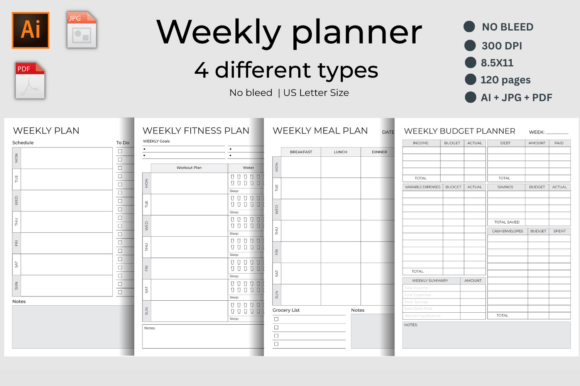
Think of Weekly Planner Logbook KDP Interiors as the “pre-production interior” stage—what sits between your design intent and Amazon’s technical requirements. Before you open Canva or Illustrator, before you write a book description or select keywords, you’re working with pages that must meet precise specs: 8.5″ × 11″, no bleed, 300 dpi resolution, PDFs optimized for print clarity, and AI files ready for edits. This bundle delivers exactly that—four distinct 120-page interiors, each validated through real KDP uploads and print previews.
It’s used before cover design (to confirm page count and layout flow), during branding (with customizable headers, icons, and section labels), and after launch (as a reusable template for variations—e.g., switching from “Weekly Fitness Plan” to “Postpartum Wellness Tracker” by updating headers and reordering pages).
Four Interiors, One Cohesive System
The strength of Weekly Planner Logbook KDP Interiors lies in its modular yet unified architecture. Each of the four 120-page interiors serves a distinct functional need—but shares consistent spacing, typography hierarchy, margin logic, and grid alignment. That means:
- You can mix and match sections across planners without visual dissonance.
- Customers who buy multiple versions recognize your brand’s clean, functional aesthetic.
- You reduce QA time: if one interior passes KDP’s previewer, the others likely will too—same margins, same fonts, same export settings.
Each interior includes practical, field-tested layouts:
- Weekly Plan Schedule: Combines time-blocking, task prioritization, and reflective note space—not just blank lines, but intentional whitespace for decisions made mid-week.
- Weekly Fitness Plan: Tracks inputs (water, sleep) and outputs (workouts, energy levels) in parallel columns—designed for quick logging during morning routines or post-gym reflection.
- Weekly Meal Plan: Integrates recipe notes with grocery list generation—no separate sheets to misplace; the dinner plan flows directly into the shopping column.
- Weekly Budget Planner: Structures cash flow around weekly cycles—not monthly abstractions—so income fluctuations, freelance payments, or side-hustle deposits land where they matter most.
Integration With Design and Publishing Tools
Weekly Planner Logbook KDP Interiors ships with four JPG previews, four production-ready PDFs, and one editable AI file (Adobe Illustrator, 300 dpi). That combination supports different stages of your process:
- JPGs are for quick client previews, mockup integration, or social media teasers—no software needed.
- PDFs go straight to KDP after cover pairing; no re-exporting, no font substitution risks, no bleed warnings.
- The AI file lets you adjust colors, swap icons, modify headers, or add your logo—without rebuilding grids or recalculating margins.
This setup works cleanly alongside tools like Canva (for covers), Kindle Create (for EPUB conversion if expanding to digital), or even Notion (for tracking which interiors you’ve uploaded, when, and with what ASINs). It also pairs well with batch-uploading workflows—upload one interior, duplicate the KDP listing, change title/subtitle/keywords, and swap in the next interior PDF.
Practical Implementation Tips for Creators
Here’s how experienced KDP publishers use Weekly Planner Logbook KDP Interiors to save time and increase output quality:
- Start with the AI file to establish your brand palette and icon set—then apply those globally across all four interiors before exporting final PDFs.
- Use the “Notes” pages not just for reflection, but for version control: jot down date, changes made, and KDP upload status—handy when managing dozens of listings.
- Test print one page from each interior on your home printer before bulk uploading—verify line weights, gray tones, and spacing at actual size. What looks crisp on screen may blur or shrink in KDP’s previewer.
- Repurpose sections across niches: The “Weekly Budget Planner” interior becomes a “Freelancer Income Tracker” with minor header edits; the “Fitness Plan” adapts to “Study Session Tracker” by renaming “Workout” to “Focus Block” and adjusting metrics.
Consistency Without Rigidity
One common pitfall in low-content publishing is over-standardizing—creating interiors so generic they blend in, or so rigid they resist adaptation. Weekly Planner Logbook KDP Interiors avoids both. Its 120-page structure isn’t arbitrary: it allows for 52 weeks + review pages + flexible extras (e.g., habit trackers, goal-setting prompts), while staying under KDP’s 828-page soft limit for standard paperbacks. You can trim to 100 pages or expand to 140 without breaking the grid—because the underlying AI file uses anchored text boxes and scalable vectors, not rasterized layouts.
That flexibility matters in practice. A teacher might remove the “Weight” row from the Fitness interior and add “Classroom Behavior Notes.” A small business owner might insert a “Client Follow-Up” column into the Weekly Plan interior. The pages support evolution—not just static use.
Long-Term Usability and Quality Control
Because these interiors were tested across multiple KDP categories—including “Planners,” “Productivity Journals,” and “Health & Fitness Logs”—they reflect real-world buyer expectations: clear headings, sufficient line height for varied handwriting styles, intuitive progression from Monday to Sunday, and logical grouping of related metrics (e.g., Sleep + Energy + Water on the same spread).
For long-term use, consider these habits:
- Keep a master folder labeled “KDP Interiors – Weekly Planner Bundle” with dated subfolders (e.g., “v2.1 – Added Minimalist Icons”).
- Bookmark Amazon’s Interior Requirements page and re-check specs every 3–4 months—KDP occasionally updates margin or DPI guidance.
- Run each new PDF through KDP’s online previewer before publishing—not just once, but after any edit to headers, fonts, or page numbers.
Quality control here isn’t about perfection—it’s about predictability. When your interior renders consistently across devices, prints cleanly on cream and white paper, and supports customer annotations without crowding or overlap, you reduce returns, negative reviews, and support requests.
Final Thought: Planning the Planner
Weekly Planner Logbook KDP Interiors succeeds because it treats planning as a repeatable, improvable process—not a one-off product. It doesn’t assume you’ll use every page, or follow every section in order. Instead, it offers scaffolding: reliable structure you can build upon, simplify, or extend based on real usage data, customer feedback, or your own evolving workflow.
That’s why it works for educators designing classroom tools, freelancers managing client deadlines, or hobbyists building niche journals for specific communities. It’s not a finished product handed down—it’s infrastructure you refine, adapt, and trust across projects, categories, and years.